Meet the GeoRank Marketing tab: ad landing pages with a readiness check

Exclusive GeoRank Premium & Prestige Feature (Available on Request)
When you run an ad for a local business, the page it opens should have one job. GeoRank's new Marketing tab, currently in beta, is built for exactly that: simple campaign landing pages that sit apart from your main website.
What a campaign page is
Campaign pages are headless landing pages for ads. They have no menu or header, they are hidden from search engines and from the sitemap, and they are kept in their own /lp/ folder.
They open in a limited editor. You can change the words and pictures, but the parts that ad platforms look for (offer terms, business details and a Privacy Policy link) cannot be deleted.
A readiness check under every page
Under each campaign page, a readiness check lists what could get an ad rejected. It marks each item with a tick, a warning or a cross:
- no site menu or header, and the page is hidden from search engines
- a WhatsApp button with a real number
- offer terms on the page, and the business name in the footer
- Privacy Policy and Terms pages that exist
- a page title, and one main heading
- any
[[double bracket]]placeholders you still need to fill in
It lowers the risk of a rejected ad. It cannot promise approval.
Set up once, in one place
The Setup tab, "Before you run ads", checks that your WhatsApp number is saved, that your business name and phone are filled in, that your Privacy Policy and Terms pages exist, and whether a tracking code has been added.
Below it, Header and footer code is where you paste StatCounter, Google Analytics, the Google tag or the Meta (Facebook) Pixel. One tick box applies that code to your campaign pages as well as the rest of the site.
One tip from the tab itself: keep pop-ups, chat bubbles and exit-intent tools out of any code that reaches campaign pages, because Google and Meta can reject ads that land on a page with them. Tracking tags are fine.
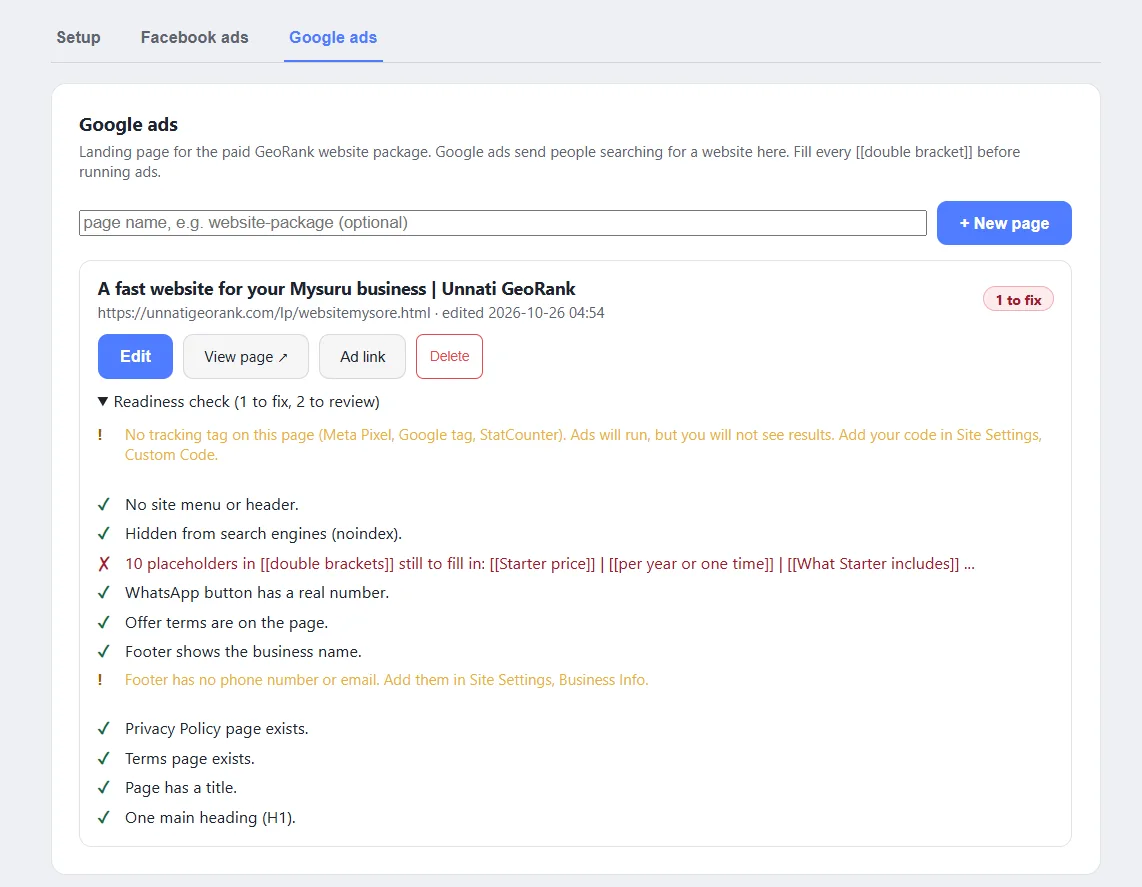
Separate tabs for Facebook ads and Google ads
The Facebook ads tab creates a landing page for Facebook and Instagram ads. Its one job is to get visitors to message you on WhatsApp. A Google ads tab sits beside it for search ads.
Want to see what else is built into every GeoRank website? See what is included, or read how the GeoRank Page Builder makes pages from ready-made blocks.
Questions about running ads for your business? Message us on WhatsApp.